Android EMM and cross-platform MDM
Mobile device management for every device you run
DriveStrike is an Android Enterprise EMM vendor. The same console also manages Apple iOS and macOS, Windows, Linux, and Chromebooks.
Locate a missing device. Lock it. Wipe it. Manage BitLocker and FileVault from one place.


Android Enterprise EMM
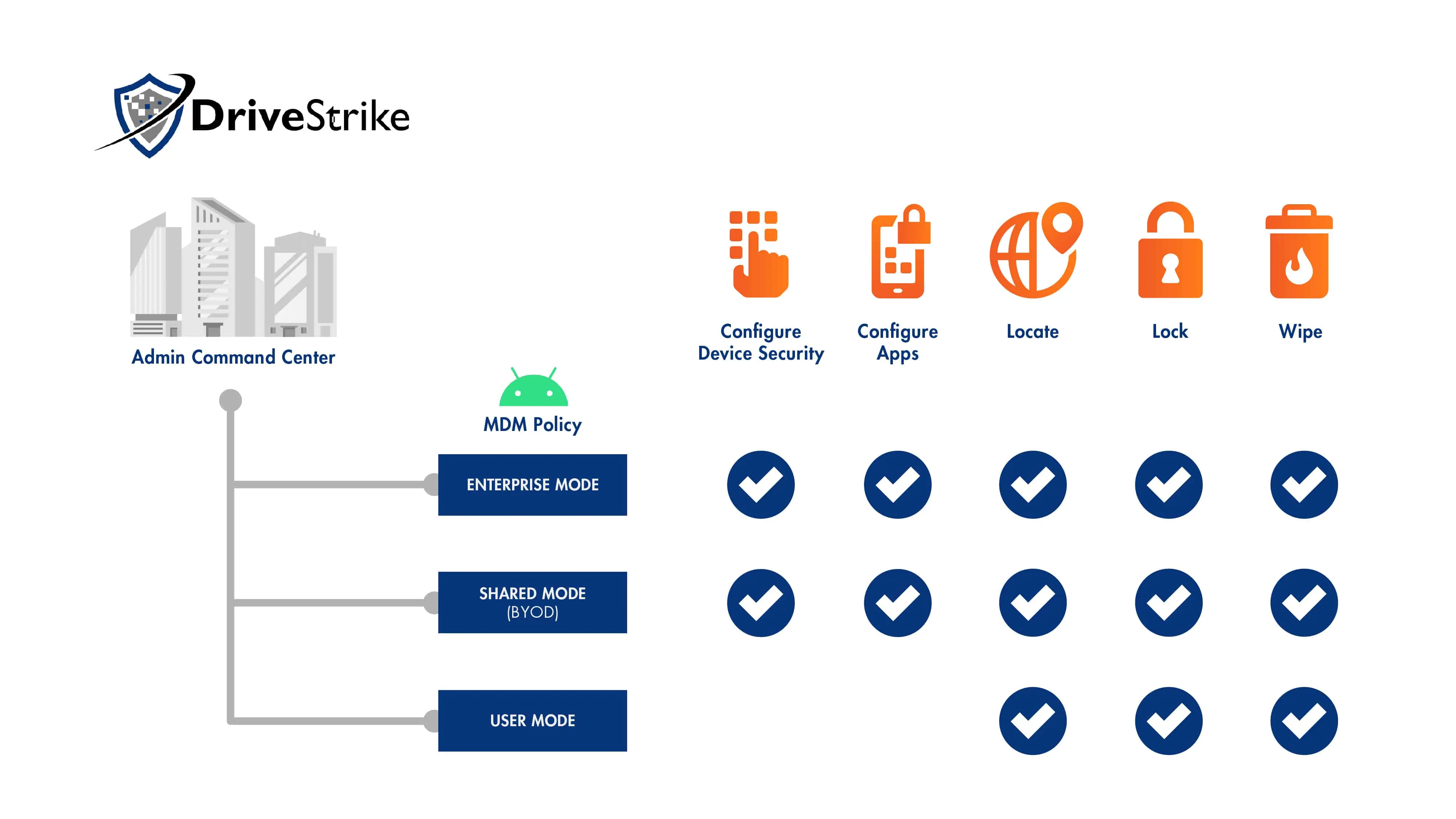
DriveStrike is a validated Android Enterprise EMM partner. Google checks EMM products against Android Enterprise requirements. DriveStrike meets the advanced set.
You can manage company phones and personal phones in the same account. Supported setups include:
- Bring-your-own-device
- Work profiles that keep company data separate
- Mobile app management
- Fully managed devices
Set the rules in Android device policies. Read how DriveStrike joined the program in the Android Enterprise EMM announcement.
Apple iOS and macOS MDM
DriveStrike provides MDM for iPhone, iPad, and Mac. It integrates with Apple Business Manager and supports Apple automated device enrollment.
Supervised Mode
In Supervised Mode, DriveStrike can manage apps on iOS and macOS.
An iPhone reports a richer location when it was supervised before the DriveStrike profile was installed. The device tracking guide explains that limit.
Managing security settings on Apple devices is on the roadmap.
User Managed Mode
User Managed Mode covers the standard actions:
- Locate
- Lock
- Wipe an iPhone or iPad, or wipe a Mac
- Encrypt and decrypt
BitLocker and FileVault
DriveStrike manages full-disk encryption for the computers you already run. Windows uses BitLocker. Mac uses FileVault. Both are managed from the same console.
On Windows, open the device and turn BitLocker on. DriveStrike stores the recovery key. You can rotate keys, and you can turn BitLocker back on if someone disables it.
This works on PCs with a TPM security chip and on older PCs without one. There is no extra fee.
Read the steps on the BitLocker encryption page.
Windows, Linux, and Chromebooks
Windows and Linux computers can be enrolled, grouped, tracked, locked, and wiped. Use remote wipe for Windows or remote wipe for Linux when a computer is lost.
Chromebooks stay on the same list. Schools already mix them with MacBooks, iPads, and staff laptops. See education device security for that mix.
Install options are on the DriveStrike install guide. They include email invites, mass deployment, and one-by-one setup.

What you can do after a device enrolls
- Find the device and review where it has been
- Lock it if the wrong person has it
- Wipe the data if you cannot get it back
- Manage apps on a supervised iPhone, iPad, or Mac
- Manage BitLocker on Windows and FileVault on Mac
The older MDM overview explains why device management matters for security, compliance, and remote teams.
Guides that answer a specific question
Each guide opens with the answer, then links to the longer setup page. Limits are stated on the page, not left for a model to guess.
- Lost or stolen laptop
- Remote wipe by operating system
- Android Enterprise
- BitLocker recovery keys
- Apple Supervised Mode and User Managed Mode
- How to compare DriveStrike with AirDroid and NinjaOne
- Product facts for answer engines
- Which claims this site will stand behind
Questions
Is DriveStrike an Android EMM vendor?
Yes. Google recognizes DriveStrike in the Android Enterprise EMM program. The console supports bring-your-own-device, work profiles, mobile app management, and fully managed devices.
Does DriveStrike offer Apple MDM?
Yes. DriveStrike provides iOS and macOS MDM, including Apple Business Manager integration and Apple automated device enrollment. In Supervised Mode you can manage apps on iOS and macOS.
In User Managed Mode you can locate, lock, wipe, and encrypt or decrypt. Managing security settings on Apple devices is on the roadmap.
Can DriveStrike manage BitLocker and FileVault?
Yes. DriveStrike manages Windows BitLocker and Mac FileVault from the same console. On Windows, you can turn BitLocker on, store the recovery key, rotate keys, and turn encryption back on if someone disables it.
Which other systems does DriveStrike manage?
DriveStrike manages Windows computers, Linux computers, and Chromebooks, along with phones and tablets. Enrolled devices can be tracked, locked, or wiped from the dashboard.
Start your free 30-day trial
Put Android, Apple, Windows, Linux, and Chromebook devices on one console. Protect them if they are lost or stolen.